Show your chargers' live status on your own website
If you run a hotel, a car park, a shop or anywhere else with public EV chargers, you can show visitors whether a charger is available right now. It is one line of HTML, it is free, and there is no account to open.

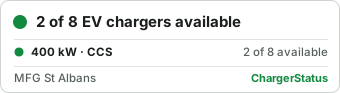
The badge for MFG St Albans, as it is this minute: the small one and the detailed one.
How to add it
- Find your site on ChargerStatus: search for your town or postcode on the front page, and open your site's page.
- On that page, just above "About this site", your badge is shown in two versions, small and detailed, under "Run this site? Show this on your own website". Click "Show the badge code" below them and copy the line of HTML for the one you prefer.
- Paste it into your own page, wherever you tell guests about parking or charging. In WordPress, Wix or Squarespace, use a "Custom HTML" or "Embed code" block.
What it shows
- How many of your chargers are available right now, or that they are all in use or out of order, from your charging network's own live data. It is the same status as on your site's page here.
- Your site's name and its fastest charger's power.
- The detailed badge adds a line for each type of charger you have, such as "80 kW · CCS" or "22 kW · Type 2", with how many of them are available, in use or out of order.
- It links to your site's page on ChargerStatus, where visitors can see each charger, the price and how busy it gets.
The picture is fetched from ChargerStatus each time your page is shown, so it is always current: there is nothing for you to update. If your network publishes no live status, the badge shows how many charge points you have instead.
The small print
- It is free to use on any website, for as long as you like. Please keep the link around the picture: it is how visitors reach the detail.
- It is a plain picture: no scripts, no cookies and no tracking run on your website. When it is shown, the visitor's browser asks our server for the picture, as with any picture on the web; our privacy page says what our server records.
- Something wrong, or your site is missing? Email hello@chargerstatus.com.